How to Create a Zebra? Smarty, jQuery, CSS3
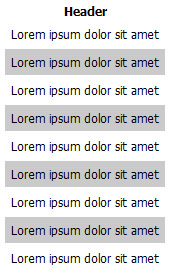
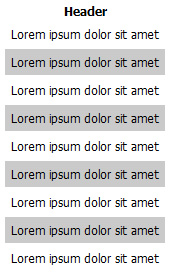
A "zebra" refers to colouring every n-th row of a table or numbered list, significantly improving readability - especially for long tables. This article covers various ways to achieve alternating row colouring using different techniques: CSS, CSS3, jQuery and Smarty.
 A "zebra" refers to colouring every n-th row of a table or numbered list, significantly improving readability - especially for long tables. This article covers various ways to achieve alternating row colouring using different techniques: CSS, CSS3, jQuery and Smarty.
1. Using CSS for a static table:
table tr.even td {

   background: #cacaca;
}
<table>

<thead>
<tr>
<th>Header</th>
</tr>
</thead>
<tbody>

<tr>
   <td>Lorem ipsum dolor sit amet</td>
</tr>

<tr class="even">
   <td>Lorem ipsum dolor sit amet</td>
</tr>

...

</table>
Advantage - universal, as it works in all browsers.
Disadvantage - only suitable for static tables;
2. Using CSS3
table tr:nth-child(even) {

   background-color: #cacaca;
}
<table>
<thead>
<tr>
   <th>Header</th>
</tr>
</thead>

<tbody>
<tr>
   <td>Lorem ipsum dolor sit amet</td>
</tr>

<tr>
   <td>Lorem ipsum dolor sit amet</td>
</tr>

...

</table>
Advantage - works for tables of undefined length;
Disadvantage - CSS3 will not work in older browsers, i.e. IE8, 7, 6
3. Using JavaScript - the jQuery library.
.even {

  background: #cacaca;
}
$(document).ready(function(){

   $("tr:even").addClass("even");
});
Advantage - works for tables of undefined length, as long as the browser supports JavaScript;
Disadvantage - for longer tables, the table will load first and then the colouring will be applied.
4. Using JavaScript and the jQuery library - a more complex scenario.
$(document).ready(function(){

   $('table tr').each(function(i, it){

      if(i % 2 == 0) {

         $(this).addClass('even');
      }

   })

});
The element's (row's) index is divided and depending on whether there is a remainder (% operator), it is determined whether it is an even or odd row. Even rows are assigned the CSS class "even", which in turn provides the row colouring.
5. Using the PHP template system Smarty.
<table>
<thead>
<tr>
   <th>Header</th>
</tr>
</thead>

<tbody>

{foreach from=$items item=item name=foo}

   <tr {if $smarty.foreach.foo.index % 2}class="even"{/if}>

      <td>Lorem ipsum dolor sit amet</td>

   </tr>

{/foreach}

</tbody>
</table>
As we can see, the mechanism is similar - the element's index is divided by 2 and depending on whether there is a remainder, it is determined to be an even or odd record. The class declaration is added in the template. This method is more universal than method 1, as it allows the table to be processed dynamically.
6. Using the PHP template system Smarty - a more complex scenario.
{counter assign=k start=0}

{foreach from=$items item=item name=foo}

   {math equation="n % 2" n=$k assign="nth"}

      <tr {if $nth}class="even"{/if}>
         <td>Lorem ipsum dolor sit amet </td>
      </tr>

   {counter}

{/foreach}
In this scenario, the index is incremented each time the counter operator is called. Useful in cases where the foreach loop index cannot be used for some reason - for example, in cases where a comparison is made before creating the HTML record (checking whether the record is empty, etc.). The incremented index - k - is divided and it is determined whether the record is even or odd.
Sources used:
- http://www.smarty.net/
- http://www.quirksmode.org/css/nthchild.html
comments